Advertisement
The gym is a unique biological environment—a high-density space where heat, moisture, and communal equipment create the perfect incubator for fungi and bacteria. From the common cold to more resilient skin infections like Ringworm, Staph, or even MRSA, the risk of "bio-transfer" is significantly higher in athletic settings.For someone committed to physical performance and wellness, maintaining an "Athletic Boundary" is essential to ensure that your workout routine builds your health rather than compromising it. Here are ten high-quality pillars for managing hygiene and infection control in fitness environments.1. The "Dual-Towel" SystemIn a gym, your towel is your primary protective barrier. Using a single towel for both the equipment and your face is one of the most common hygiene failures.The Protocol: Carry two distinct towels. Use a darker-colored towel exclusively to lay on benches and machines to act as a barrier against other people's sweat. Use a lighter-colored, microfiber towel only for wiping sweat off your own face and body.The Logic: This prevents the transfer of surface bacteria (like Staphylococcus) from a communal weight bench directly into your pores or eyes.2. Equipment Sanitization: The Before and After RuleWhile many gyms provide disinfectant sprays, most users only wipe down equipment after they use it as a courtesy. To protect yourself, you must be proactive.The Routine: Spray and wipe the handles, seat, and adjustment pins before you touch them.Dwell Time: Professional disinfectants often require 30-60 seconds of wet contact to kill pathogens. Spray the equipment, wait a moment while you adjust your music or gloves, and then wipe.3. Footwear Integrity and "Locker Room Safety"Locker rooms and communal showers are the primary sites for fungal transmissions, such as Athlete’s Foot (Tinea pedis) and plantar warts.The Shower Shoe Rule: Never let your bare feet touch the floor of a gym shower or locker room. Wear rubber flip-flops or specialized shower shoes at all times.The Shoe Swap: Change out of your gym shoes immediately after your workout. Storing damp, sweaty shoes in a dark gym bag encourages fungal growth. Use a charcoal insert or an antifungal spray inside your shoes after every session.4. Barrier Clothing and Skin ProtectionWhile "gym aesthetics" often lean toward minimal clothing, exposing more skin increases your risk of abrasions and subsequent infections.The Gear: Wear moisture-wicking compression gear that covers your thighs and upper arms. This acts as a secondary "skin" that prevents direct contact with communal upholstery.Abrasions: If you have any cuts or "turf burns," cover them with a waterproof bandage before entering the gym. Broken skin is a wide-open door for pathogens.5. Personal Item SequestrationYour gym bag can quickly become a "fomite"—an object that carries infection.The Wet Bag: Always place your sweaty gym clothes and used towels into a sealed, waterproof "wet bag" before putting them into your main gym bag.The Floor Rule: Avoid placing your gym bag directly on the locker room floor. Use the hooks provided. The floor is the most contaminated surface in the facility.6. The Post-Workout "Golden Hour"The faster you remove sweat and bacteria from your skin, the lower your risk of "Acne Mechanica" (breakouts caused by friction and sweat) and fungal infections.The Shower Timing: Aim to shower within 60 minutes of finishing your workout.Antimicrobial Soap: Use a tea tree oil-based or eucalyptus-based body wash. These natural antimicrobials are effective against fungal spores without being as harsh as synthetic chemical soaps.7. Hydration Hygiene: The No-Touch RefillGym water fountains are communal hubs for respiratory droplets.The Technique: Use a bottle with a "sip" lid rather than an open mouth. When refilling, ensure the nozzle of the fountain does not touch the rim of your bottle.Daily Sanitization: Wash your gym water bottle daily in the dishwasher at a high-heat setting ($60°C+$). Residual protein shake powder left in a bottle is a high-yield nutrient source for bacteria.8. Handling "Shared Gear": Mats and BeltsYoga mats and lifting belts are porous materials that trap skin cells and moisture.Bring Your Own: If possible, always bring your own mat. If you must use a gym-provided mat, use a "mat towel" with silicone grips to cover the entire surface.The Wipe-down: If you use a communal lifting belt, wipe the interior (the side touching your clothing/skin) with a disinfectant wipe before and after use.9. Hand Hygiene and "Face Touching"We unconsciously touch our faces an average of 16-23 times per hour. In a gym, this is the primary way respiratory viruses enter your system.The Mental Trigger: Train yourself to never touch your eyes, nose, or mouth during a workout. If you need to wipe sweat, use your "clean" face towel, not your hands.Sanitize Between Sets: Keep a small bottle of hand sanitizer clipped to your gym bag and use it after finishing a circuit on a machine.10. Laundry Hygiene for Athletic FabricsHigh-performance synthetic fabrics (spandex, polyester) are designed to "wick" moisture, but they also trap "body soils" and bacteria deep within the fibers.The Wash Protocol: Turn gym clothes inside out before washing (this is where the most bacteria reside). Use an "activewear" detergent that contains enzymes designed to break down sweat proteins.Avoid Fabric Softener: Softeners leave a coating on the fibers that traps bacteria inside and reduces the fabric’s "wicking" ability, leading to that permanent "gym smell."Conclusion: Peak Performance, Peak HygieneAn active lifestyle requires an active defense. By implementing these ten pillars of athletic infection control, you ensure that your time in the gym remains a positive investment in your longevity. Protecting your skin and respiratory system is just as important as hitting your personal best on the bench press.
  • Infection Control
  • Personal Hygiene
  • Office Hygiene and Infection Control for Professionals

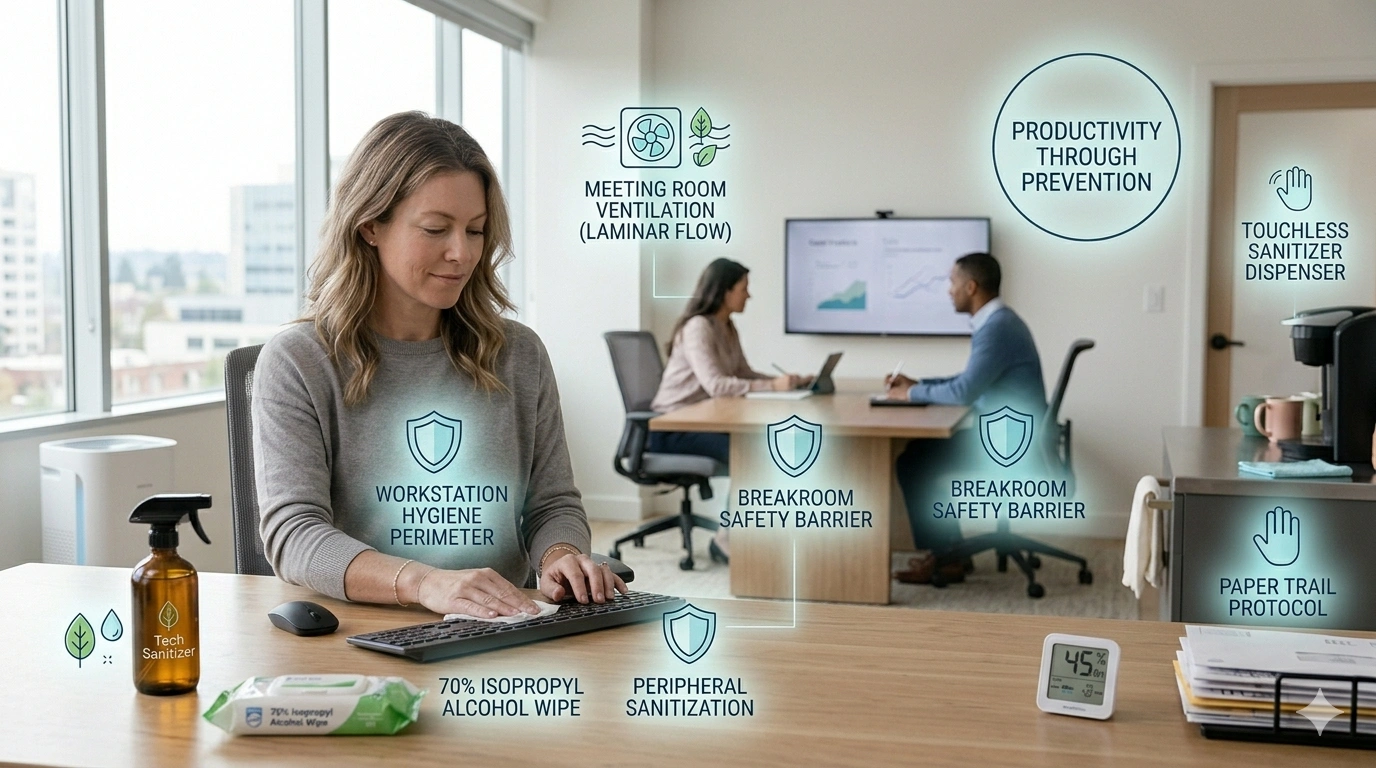
    For many entrepreneurs and professionals, the workplace is a secondary home. However, unlike your personal residence, an office or a coaching center is a communal biome where you have limited control over the hygiene habits of others. High-traffic areas like conference rooms, shared workstations, and communal breakrooms can become significant reservoirs for pathogens if not managed with clinical precision.

    Maintaining a professional “hygiene perimeter” allows you to focus on productivity without the constant threat of seasonal illness. Here are ten high-quality pillars for mastering infection control in a professional shared environment.

    1. The Workstation Sanitization Protocol

    Your desk is your primary interface with the work world, and it is often a “hotspot” for bacteria. Studies have shown that the average office desk harbors hundreds of times more bacteria per square inch than a toilet seat.

    • The Daily Wipe-down: Begin and end your day by wiping your desk surface, mouse, and keyboard with a 70% isopropyl alcohol solution.
    • The “Clear Desk” Policy: Maintaining a minimalist workspace isn’t just for aesthetics; it reduces the number of surfaces where dust and microbes can settle, making daily disinfection significantly faster and more effective.

    2. Digital Hardware and Shared Peripherals

    In a digital development environment or a computer coaching center, hardware is constantly shared. Keyboards and touchscreens are significant vectors for cross-contamination.

    • Peripheral Hygiene: If students or collaborators use your equipment, provide disposable keyboard covers or implement a mandatory “hand sanitize before use” rule.
    • The Stylus Strategy: For tablets or touch-sensitive monitors, encourage the use of individual styluses rather than bare fingers to keep screens biologically clean.

    3. Communal Breakroom Safety

    The office kitchen is the highest-risk area for gastrointestinal pathogens. Shared sponges, coffee pot handles, and refrigerator doors are communal “pathogen hubs.”

    • The Paper Towel Barrier: Use a clean paper towel to handle the communal coffee carafe or microwave handle.
    • Personal Utensils: Bring your own set of mugs and utensils from home and keep them at your desk. Avoid using the “communal drawer” of silverware, which may not have been washed at a high enough temperature to ensure sterilization.

    4. Meeting Room Ventilation and ProximityEnclosed meeting rooms are primary environments for respiratory droplet transmission.

    • The Air Exchange: If the room lacks a window, keep the door slightly ajar during meetings to encourage airflow.
    • The “L” Seating Arrangement: Instead of sitting directly across from someone (where respiratory “plumes” intersect), sit at a $90°$ angle. This simple shift in geometry significantly reduces the direct inhalation of shared aerosols.

    5. Managing the “Paper Trail”

    While we live in a digital world, physical documents, mail, and packages still move through offices.

    • The Mail Protocol: Designate a specific “in-box” area for mail and packages away from eating or high-focus zones.
    • Hand Hygiene: Always wash or sanitize your hands after sorting through mail or handling physical currency, as paper and cloth surfaces can harbor bacteria for several hours.

    6. The “Symptom-Free” Workplace Culture

    As a business owner or founding manager, you set the biological tone for the office.

    • The Lead-by-Example Rule: If you are feeling unwell, utilize remote work capabilities immediately. Presenteeism—coming to work while sick—is a major driver of office-wide outbreaks that can halt productivity for weeks.
    • Digital Coaching Safety: In a coaching center environment, implement a clear policy that students who are coughing or feverish should attend sessions virtually or reschedule.

    7. Strategic Hand Sanitizer Placement

    Human behavior is dictated by convenience. If a sanitizer bottle is 20 feet away, it won’t be used.

    • The “Nudge” Strategy: Place touchless sanitizer dispensers at every entry point, outside elevators, and directly on the center of conference tables.
    • The Visual Cue: Seeing a sanitizer bottle acts as a psychological “nudge,” reminding employees and students to maintain their hygiene boundary throughout the day

    8. Restroom Exit Protocol

    Office restrooms are high-traffic areas where “flush plumes” are common.

    • The Barrier Exit: After washing your hands, use your paper towel to turn off the faucet and open the exit door.
    • The Air Quality Factor: Ensure the restroom exhaust fan is operational 24/7. This creates negative pressure, preventing restroom air from drifting into the main office space.

    9. Controlling the “Digital-Physical” Interface

    We often wash our hands, then immediately pick up a smartphone that has been sitting on a shared conference table.

    • The “Elevated” Phone: Avoid placing your phone directly on communal surfaces. Use a small stand or keep it in your pocket.
    • Daily Tech Sanitization: Just as you sanitize your desk, your mobile devices should receive a UV-C treatment or an alcohol wipe-down every evening to ensure you aren’t bringing “office germs” back into your home sanctuary.

    10. HVAC and Filtration in Shared Spaces

    In a computer coaching center or studio, the heat from electronics can create stagnant “heat pockets” where air doesn’t circulate.

    • HEPA Supplementation: If your office HVAC system is outdated, place standalone HEPA air purifiers in corners where air tends to stagnate.
    • The Filter Schedule: As a manager, keep a log of filter changes. In a high-traffic student environment, filters may need to be replaced more frequently than in a private residence.

    Conclusion: Productivity Through Prevention

    Office hygiene is a vital component of business operational security. By treating infection control as a professional standard—similar to data security or project management—you create an environment where your team and students can perform at their peak. A healthy workplace is a high-performance workplace.


    Leave a Reply

    Your email address will not be published. Required fields are marked *

    5 mins